
HP Laserjet Managed E60155, E60165 and E60175 Printer Repair/original HP Toner Cartridges, HP Managed E60155, E60165 and E60175 Maintenance Service Error Code Repairs and Fuser Kit Sale, HP Managed E60155, E60165 and E60175 Repair Los Angeles, Orange County and Riverside County!
Hewlett Packard Managed E60155, E60165 and E60175 service error code repairs and HP Managed E60155, E60165 and E60175 new and refurbished printer sale near you in Southern California!
HP Laser-Jet Managed E60155, E60165 and E60175 printer repair/service in Los Angeles, Orange County and Riverside. We specialize on HP managed E60155, E60165 and E60175 on-site repair in Los Angeles and Orange County with image defects, vertical lines, horizontal lines, repeating dots, error messages, error codes and maintenance errors.
We provide fast onsite HP managed E60155, E60165 and E60175 maintenance service in Southern California. Our technicians have the knowledge to repair HP managed E60155, E60165 and E60175 printers on the first visit.
We offer 6 months warranty on all Laser-Jet Managed E60155, E60165 and E60175 replacement parts in Southern California. We carry most common HP Managed E60155, E60165 and E60175 parts to fix hardware failures with numerical error code on the first visit.
Managed HP E60155, E60165 and E60175 image defects and paper jams can be solved by replacing maintenance kit.
We repair HP Managed E60155, E60165 and E60175 service with smeared prints, toner not bonding to paper, dirty printing and grinding noise. Our certified printer repair technicians carry Managed E60155, E60165 and E60175 Fuser Unit, Maintenance Kit, Roller Kits and paper cassette trays.
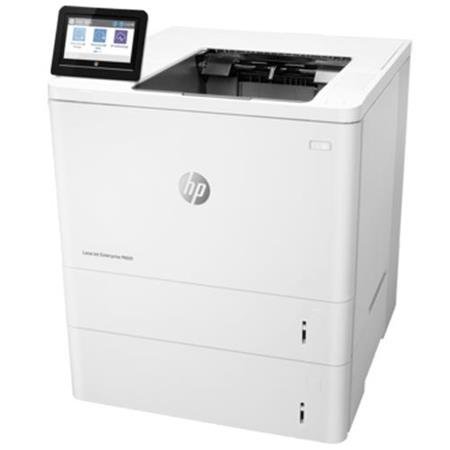
HP Laser-jet Managed E60155, E60165 and E60175 Printer Technical Specification
| Connectivity specifications | |
| Connectivity features | Model E60155dn, E60165dn, E60175dn(Product # 3GY09A, 3GY10A, 3GY12A) |
| 10/100/1000 Ethernet LAN connection with IPv4 and IPv6 | Included |
| Hi-Speed USB 2.0 | Included |
| Easy-access USB port for printing without a computer and upgrading the firmware | Included |
| Hardware Integration Pocket for connecting accessory and third-party devices | Included |
| HP Internal USB Ports | Optional |
| HP Jet direct 2900nw Print Server accessory for wireless connectivity | Optional |
| HP Jet direct 3100w BLE/NFC/Wireless Accessory for printing from mobile devicesnote: Connected via the Hardware Integration Pocket or the rear host USB port. The HP Jet-direct 3100w BLE/NFC/Wireless Accessory requires the HP Internal USB ports accessory. | Optional |
| Other Specifications | |
| Feature | Model E60155dn, E60165dn, E60175dn(Product # 3GY09A, 3GY10A, 3GY12A) |
| Memory: 512 MB memory, expandable to 1.5 GB by adding 1 GB DIMM | Included |
| Memory: HP Secure High-Performance Hard Disk | Optional |
| Security: HP Trusted Platform Module for encrypting all data that passes through the printer | Included |
| Control panel: Constant-view color touchscreen control panel | Included |
Supported operating systems
Linux: For information and print drivers for Linux, go to www.hp.com/go/linuxprinting.
UNIX: For information and print drivers for UNIX®, go to www.hp.com/go/unixmodelscripts.
The following information applies to the printer-specific Windows HP PCL 6 print drivers, HP print drivers for mac OS, and to the software installer.
Windows: Download HP Easy Start from 123.hp.com/LaserJet to install the HP print driver. Or, go to the printer-support website for this printer: www.hp.com/support/ljE60155, www.hp.com/support/ljE60165, or www.hp.com/support/ljE60175 to download the print driver or the software installer to install the HP print driver.
Mac-OS: Mac computers are supported with this printer. Download HP Easy Start either from 123.hp.com/LaserJet or from the Printer Support page, and then use HP Easy Start to install the HP print driver.
- Go to 123.hp.com/LaserJet.
- Follow the steps provided to download the printer software.
| Supported operating systems and print drivers | |
| Operating system | Print driver (for Windows, or the installer on the web for macOS) |
| Windows 7, 32-bit and 64-bit | The “HP pcl 6” printer-specific print driver is installed for this operating system as part of the software installation. |
| Windows 8, 32-bit and 64-bit | The “HP PCL 6” printer-specific print driver is installed for this operating system as part of the software installation. |
| Windows 8.1, 32-bit and 64-bit | The “HP PCL-6” V4 printer-specific print driver is installed for this operating system as part of the software installation. |
| Windows 10, 32-bit and 64-bit | The “HP PCL-6” V4 printer-specific print driver is installed for this operating system as part of the software installation. |
| Windows Server 2008 R2, SP 1, 64-bit | The PCL 6 printer-specific print driver is available for download from the printer-support website. Download the driver, and then use the Microsoft Add Printer tool to install it. |
| Windows Server 2012, 64-bit | The PCL 6 printer-specific print driver is available for download from the printer-support website. Download the driver, and then use the Microsoft Add Printer tool to install it. |
| Windows Server 2012 R2, 64-bit | The PCL 6 printer-specific print driver is available for download from the printer-support website. Download the driver, and then use the Microsoft Add Printer tool to install it. |
| Windows Server 2016, 64-bit | The PCL 6 printer-specific print driver is available for download from the printer-support website. Download the driver, and then use the Microsoft Add Printer tool to install it. |
| macOS 10.12 Sierra, macOS 10.13 High Sierra | Download HP Easy Start from 123.hp.com/LaserJet, and then use it to install the print driver. |
note: Supported operating systems can change.
note: For a current list of supported operating systems, go to www.hp.com/support/ljE60155, www.hp.com/support/ljE60165, or www.hp.com/support/ljE60175 for HP’s all-inclusive help for the printer. note: For details on client and server operating systems and for HP UPD driver support for this printer, go to www.hp.com/go/upd. Under Additional information, click the links.
| Minimum system requirements | |
| Windows | macOS |
| Internet connectionDedicated USB 1.1 or 2.0 connection or a network connection2 GB of available hard-disk space1 GB RAM (32-bit) or 2 GB RAM (64-bit) | Internet connectionDedicated USB 1.1 or 2.0 connection or a network connection1.5 GB of available hard-disk space |
The Windows software installer installs the HP Smart Device Agent Base service. The file size is approximately 100 kb. Its only function is to check for printers connected via USB hourly. No data is collected. If a USB printer is found, it then tries to locate a Jet Advantage Management Connector (JAMc) instance on the network. If a JAMc is found, the HP Smart Device Agent Base is securely upgraded to a full Smart Device Agent from JAMc, which will then allow printed pages to be accounted for in a Managed Print Services (MPS) account. The driver-only web packs downloaded from hp.com for the printer and installed through the Add Printer wizard do not install this service.
To uninstall the service, open the Control Panel, select Programs or Programs and Features, and then select Add/Remove Programs or Uninstall a Program to remove the service. TMANAGED he file name is HP Smart Device Agent Base.